PICKLEBALL TOURNAMENTS
Run your tournament in one place.
Manage sign-ups, payments, matches, courts, and scores in one place. Players can check schedules and results on the website, or follow their matches in the iPhone app.
Want to play? Find a tournament.New here? See how it works.Looking for results? Find a player.

ON THE APP STORE
PicklePodium for iPhone
- See your court, wait, and live score without unlocking your iPhone.
- See your next match on your Home Screen.
- Get alerts when it is your turn, your match moves, or the organizer posts an update.
 FREE · VERSION 1.1.0 · IOS 16+



FEATURED TOURNAMENTlive
Space Out 1st Open Pickleball Invitational Cup
PicklePoint Atria · Iloilo City · Nov 20 – Nov 22
View tournament →BEFORE, DURING, AND AFTER
Plan it. Run it. Share the results.
BEFORE
Get ready for your tournament
Collect sign-ups, check payments, add staff, and choose who plays whom.
DURING
Keep everyone updated
Update courts, match times, and scores. Staff and players see the same updates on the website, iPhone app, and venue screens.
AFTER
Share the final results
Players can view results after the tournament. Download your records and reuse your setup for the next one.
READY FOR MATCH DAY
Keep your tournament running
Keep scores when the internet drops
Scores waiting to upload stay on the scoring device. They upload when the connection returns.
Choose what staff can do
Give each staff member access to the tasks they need.
Check what changed
Review changes to entries, payments, staff, schedules, and results.
Get help when you need it
We back up your data every night. Contact our support team if something goes wrong.

RallyReel
by endevo
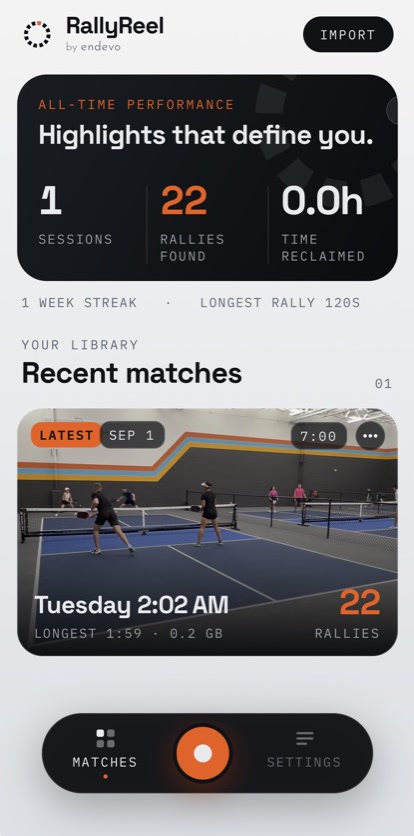
Turn your rallies into clips.
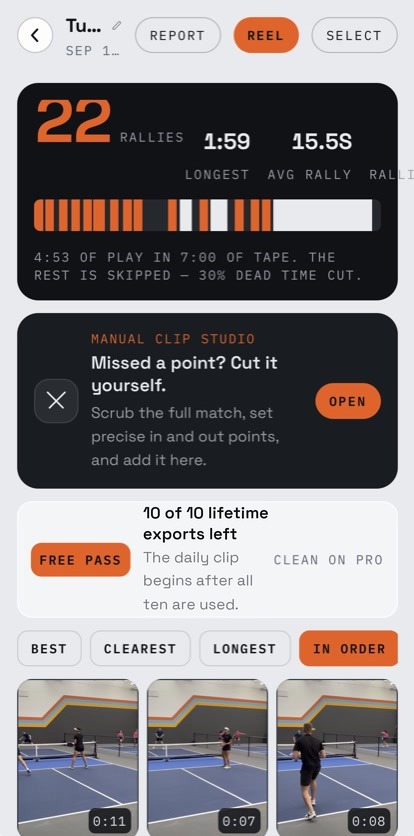
Film a match with the RallyReel iPhone app. It cuts the video into rally clips and removes the waiting between points. Your video stays on your phone. No account needed.
- Finds every rally
- Finds your best points
- Stays on your phone
PRICING
Pay once per tournament
Your first tournament with one division is free. After that, the price depends on the number of divisions. No monthly fees. Players pay tournament entry fees separately to the organizer.
One-time tournament price
₱0
Your first one-division tournament is free.
All prices · pay once per tournament
1 division
₱0
Up to 3
₱2,500
Selected price
Up to 6
₱4,000
Up to 9
₱6,000
Up to 12
₱8,000
Up to 15
₱11,000
Up to 18
₱14,000
A division is a group with its own matches and winner. For example, “Men's Doubles 3.5” and “Mixed Open” are two divisions. Above 18 divisions, each extra division costs ₱300. Sending results to DUPR costs an extra ₱149 per rated division.
COMMON QUESTIONS
Questions before you start
Do players need an account?
No. Players can sign up for a tournament with their name and contact details. An account lets them see all their entries in one place.
Is there an iPhone app?
Yes. The app is free on the App Store. See your next match on your Home Screen and follow your court, wait, and score on your Lock Screen. Get alerts when you are called to court, your match moves, or the organizer posts an announcement. You can also use PicklePodium in a web browser.
What can I ask the assistant?
Ask about match times, courts, tournament rules, or how to use PicklePodium. Organizers can also ask it to add courts or confirm entries. You review and approve a change before it happens.
Who receives the entry fees?
The tournament organizer receives them directly. PicklePodium helps the organizer track who has paid and who still needs to pay.
What if the internet stops working?
Scores waiting to upload stay on the scoring device, even if you refresh the page. They upload when the connection returns. You can also print schedules before the tournament.
What can staff change?
Co-organizers have full access to the tournament. Other staff can only use the tools for their role. You can review a record of important changes.
Can I reuse a tournament setup?
Yes. Copy the divisions, courts, and staff you want into a new tournament. Players, payments, matches, and scores are not copied.
How do I get help?
Contact our support team from the Help page. We back up the database every night and can help if data needs to be restored.